
You’ve decided to dive into local AI. You’ve read about Ollama, tinkered with interfaces like Onyx or Open WebUI, and now you have a question that keeps you up at night: can my GPU handle this? The short answer is almost always “yes, but…”. When you choose LLM for your hardware, it’s not optional: it’s the difference between a smooth experience and an afternoon of frustration watching your computer choke.
The golden rule: VRAM is king
When it comes to running an LLM locally, one factor eclipses all others: your GPU’s VRAM. It doesn’t matter if you have 64 GB of system RAM; if your card doesn’t have enough VRAM, you’re going to have problems. As Julien Simon explains in his LLM hardware guide, inference is memory-bandwidth-bound: the hardware that generates tokens fastest is the one that reads weights from memory fastest. That’s why an RTX 4090 at 1,008 GB/s is faster than an RTX 3060 Ti: it’s not just capacity, it’s bandwidth. If you already have a GPU and want to get more out of it before spending money, my GPU undervolting and overclocking tutorial can help you reduce temperatures and improve performance.
Choose LLM for your hardware: how much memory you really need
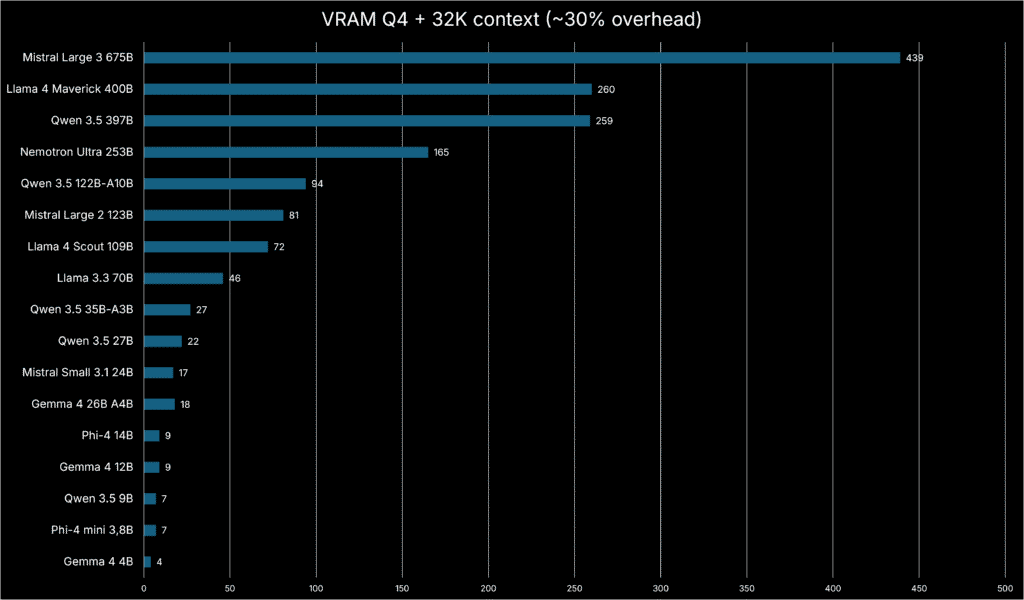
The landscape has changed radically in 2026. Six families matter now: Llama, Qwen, Mistral, DeepSeek, Gemma, and Phi. And within each there are MoE variants that change the game: a model with 26B total parameters may only activate 4B per token, running like a small model but reasoning like a large one.
When you choose LLM for your hardware, the first number you need is how much VRAM each model consumes. Breakdown using Q4_K_M quantization:
- Phi-4-mini (3.8B): ~2.5-3 GB. Fits even on 4 GB integrated GPUs.
- Qwen3 4B / Gemma 4 E4B: ~3-4.5 GB. For basic laptops with 8 GB RAM. E4B supports text, image, and audio natively.
- Qwen3 8B / Llama 3.3 8B / Mistral Small 3 7B: ~5.5-6 GB. The sweet spot for an 8 GB GPU.
- Gemma 4 12B Unified: ~7-8 GB. Dense 12B model with text, image, audio, 256K context, and MTP built in. Ars Technica confirms it runs on any laptop with 16 GB of RAM.
- Qwen3 14B / Phi-4 14B / DeepSeek R1 Distill 14B: ~8.5-10 GB. You need a 12 GB GPU.
- Gemma 4 26B A4B (MoE): ~16-18 GB. Only activates 4B per token. Large model quality at small model speed.
- Qwen3-Coder 30B-A3B (MoE) / DeepSeek R1 Distill 32B: ~18-20 GB. First for coding with 262K context; second for step-by-step reasoning.
- Llama 3.3 70B / Qwen3 72B: ~40-42 GB. Mac Studio with 128 GB unified memory or multi-GPU workstations.
What if you only have a CPU? Models from 1B to 3B work at acceptable speeds. From 7B onwards, things get slow: 5-6 tokens per second. Apple Silicon has a unique edge: a MacBook with 16 GB can run a 7B without dedicated VRAM, and a Mac Studio M4 Max with 128 GB loads a full Llama 3.3 70B.
Gemma 4 12B: the middleweight that changes everything
Google launched Gemma 4 12B in June to fill the gap between mobile and serious models. And they did it with an architecture that breaks molds: it’s encoder-free. It eliminates dedicated vision and audio encoders, using direct projections into token space. Less latency, less memory. It’s the first Gemma 4 with Multi-Token Prediction (MTP) enabled out of the box, accelerating inference 1.4-2.2x without quality loss.
The benchmarks speak clearly: 77.2% on MMLU Pro, 77.5% on AIME 2026, and 72.0% on LiveCodeBench v6, close to the 26B model (82.6%, 88.3%, 77.1%) but using half the memory. With Apache 2.0, 140+ languages, and 256K context, it’s the most versatile model in the local landscape. The Unsloth guide to running Gemma 4 locally covers CUDA and Ollama step by step.
GGUF quantization: slimming models without losing your mind
Quantization compresses model weights to use less memory, sacrificing minimal quality. Think JPEG vs RAW: smaller file, imperceptible difference for most uses. Q4_K_M is the standard: a 7B that would need ~14 GB unquantized fits in ~6 GB, with only 1-3 points of benchmark loss. Q5_K_M marginally improves quality with 15-20% more memory. Q8_0 preserves near-original quality at 1.5x the cost.
Golden rule: within the same memory budget, a larger Q4 model usually beats a smaller Q8 model. Quantization is critical when you choose LLM for your hardware. And for maximum efficiency, Google has published QAT variants of all Gemma 4 models that reduce memory 3x. The SitePoint complete guide to local LLMs also recommends INT4 when VRAM is limited.
Three hardware tiers, three realities
Tier 1: what you already have ($0)
With 8 GB of RAM and a 6-8 GB GPU (like an RTX 3060 Ti), you can already run 7B-8B models in Q4_K_M. Qwen3 8B scores 76% on HumanEval and 72.8% on MMLU. Mistral Small 3 7B is the fastest: ~50 tok/s on mid-range hardware. With only 4 GB VRAM, Phi-4-mini surprises with 68.5% on MMLU. If you’re still choosing your GPU, my post on how to change your graphics card — RTX 3060 Ti walks you through the process.
Tier 2: the smart upgrade (~$800)
With a 12-16 GB GPU, Gemma 4 12B shines: multimodal, 256K context, and MTP in just 7-8 GB of VRAM. For code, Codestral 22B reaches 88.4% on HumanEval and 94.1% on FIM, ideal for IDE autocomplete (check its license). Qwen3 14B scores 83% MMLU and 85% HumanEval. And DeepSeek R1 Distill 14B beats o1-mini on math with visible chain-of-thought.
Tier 3: no compromises (~$2,000+)
In RTX 4090/5090 territory, MoE models shine. Gemma 4 26B A4B activates only 4B per token: 82.6% MMLU Pro, 88.3% AIME 2026. For maximum quality, Gemma 4 31B dense scores 85.2% MMLU Pro and 2,150 ELO on Codeforces, fitting on an RTX 4090. Qwen3-Coder 30B-A3B does ~100 tok/s with 262K context. And DeepSeek R1 Distill 32B beats o1-mini on AIME (72.6% vs 63.6%), as covered in the daily.dev guide.
Which model fits your use case?
This list will help you choose LLM for your hardware based on your specific use case:
- IDE autocomplete: Codestral 22B (~12 GB). HumanEval 88.4%, FIM 94.1%.
- Long-context coding: Qwen3-Coder 30B-A3B (~20 GB). 262K context, ~100 tok/s.
- General chat: Llama 3.3 8B (~6 GB). Best balance, largest ecosystem.
- All-in-one (laptop): Gemma 4 12B (~7-8 GB). Text, image, audio, 256K context, MTP, Apache 2.0.
- All-in-one (max quality): Gemma 4 26B A4B (~16-18 GB). MoE, text+image, 256K context.
- Reasoning and math: DeepSeek R1 Distill 32B (~20 GB). Beats o1-mini.
- Document summarization: Qwen3 14B (~8.5 GB). 83% MMLU, 85% HumanEval.
- Multilingual: Qwen3 8B (~7 GB, 100+ languages) or Gemma 4 12B (~7-8 GB, 140+ languages).
- Minimal resources: Phi-4-mini (~3 GB). 68.5% MMLU. MIT license.
For interactive chat you need 15+ tok/s; for IDE, 30+. MoE models offer small model speed with large model quality. And with MTP, Gemma 4 12B accelerates 1.4-2.2x without losing precision.
Common mistakes that will waste your time
Three traps: first, the context that silently disappears. Ollama defaults to 2048 tokens; if you exceed it, the runtime drops the oldest tokens without warning. Always set num_ctx, especially with Qwen3-Coder (262K) or Gemma 4 12B (256K). Second, swapping: if the model doesn’t fit in VRAM and the system swaps to disk, speed collapses; the KV cache also consumes extra VRAM. Third, the license: Qwen3, Gemma 4, and Mistral use Apache 2.0; Phi-4 and DeepSeek R1 use MIT; but Llama 3.3 has restrictions and Codestral 22B is non-commercial. Always check the model card on Hugging Face.
The verdict
Local AI in 2026 looks nothing like two years ago. Gemma 4 12B proves a middleweight model can deliver full multimodal capabilities, complex reasoning, and MTP in under 8 GB of VRAM. MoE models like Gemma 4 26B A4B and Qwen3-Coder 30B-A3B have changed the rules: large model quality at small model speed. DeepSeek R1 brings o1-style reasoning to your GPU. And Phi-4-mini proves that with under 3 GB of VRAM you can already do useful AI. When you choose LLM for your hardware, the options are better and more accessible than ever. Your GPU can probably handle more than you think.