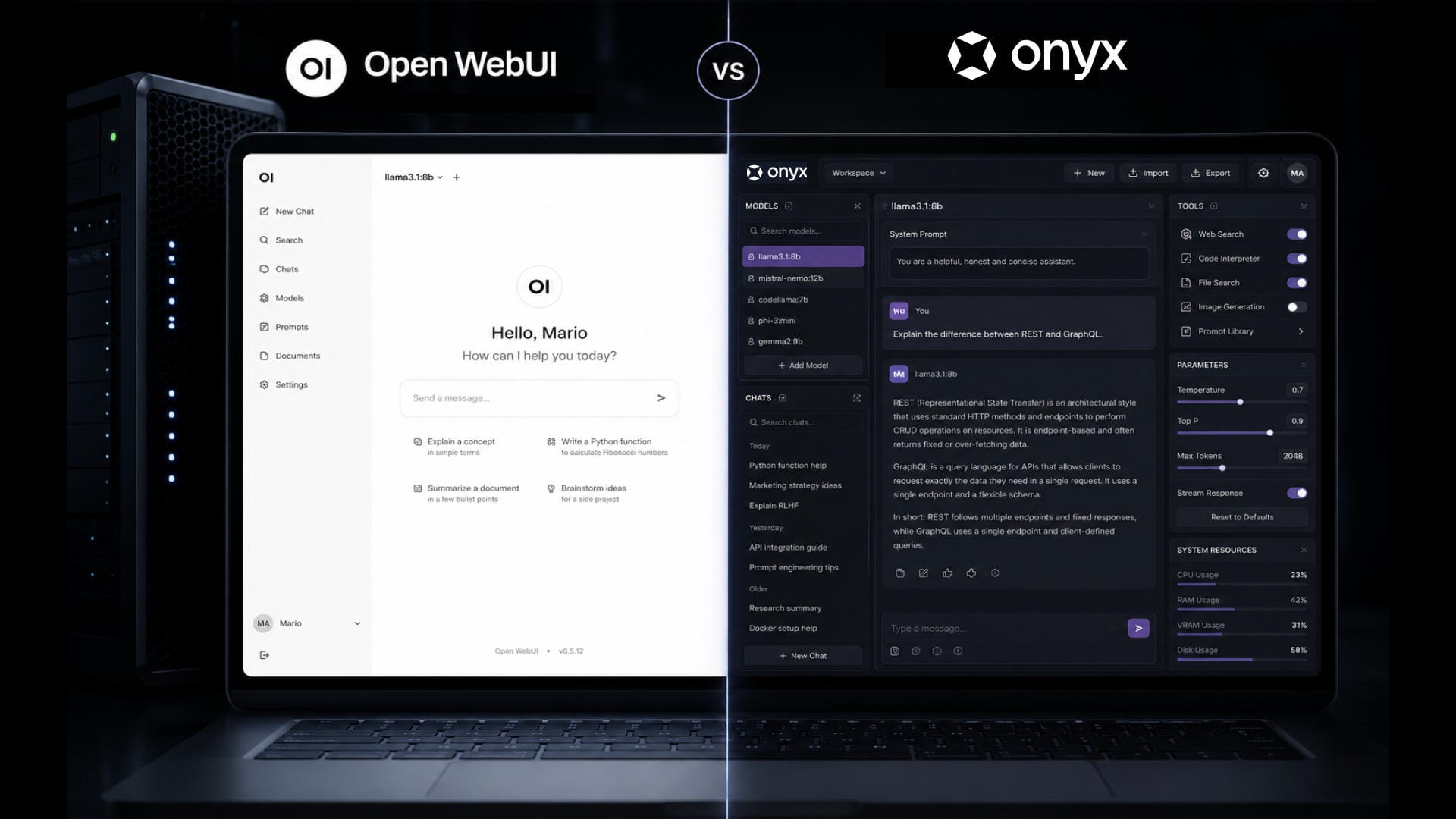

You’ve decided to dive into local LLMs and, while looking for an interface, you stumble into the eternal debate: Onyx vs Open WebUI. Great choice, because running an AI model on your own machine, without sending data anywhere and without paying subscriptions, has a hint of technological rebellion that’s quite appealing. But then you open GitHub, see dozens of options, and your enthusiasm cools down. Where do you start? Let’s compare the two most popular open source platforms so you can pick yours without headaches.
What you need before choosing an interface
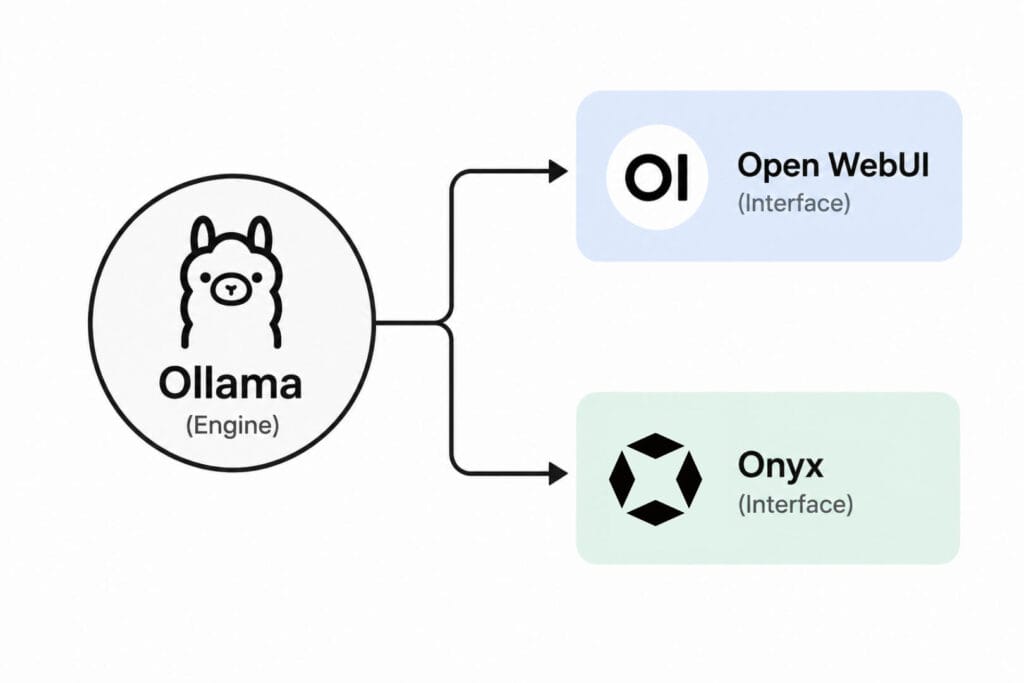
Before diving into comparisons, let’s speak the same language. To run a local LLM you need three pieces: an inference engine (usually Ollama, the de facto standard), a model (like Llama 3, Mistral or Qwen, which you download with one command), and an interface to talk to that model. That’s where Open WebUI and Onyx come in.
Think of it as a car: Ollama is the engine, and the interface is the chassis with steering wheel and seats. The engine does the heavy lifting, but you don’t want to sit on the engine block at 80 km/h. You want a dashboard, some pedals, and ideally air conditioning. That’s what we’re comparing here.
Open WebUI: the “install and go” of local LLMs
If something like “install and go” exists in the world of local AI, it’s Open WebUI. The installation is almost offensive in its simplicity: one command (pip install open-webui), sixty seconds, and you have a web interface running on your machine. No accounts, no registrations, no forms. You run it, open your browser, and you’re chatting with your model.
The interface will feel familiar if you’ve used ChatGPT or Claude: sidebar with conversations, text box at the bottom, formatted responses with support for code, images and markdown. But under that friendly face there’s real substance. You can connect Ollama, but also APIs from OpenAI, Anthropic, or any compatible provider. You start locally and, if one day you need a more powerful cloud model, you don’t have to switch tools.
For someone just getting started, this is a massive relief. There’s no infrastructure learning curve: you install, use, and learn as you go. And if one day you feel adventurous, there’s a community of over 444,000 people sharing prompts, tools, functions, and plugins that you can install with one click from the interface itself. It’s like walking into an app store, but everything is free and community-made.
Another detail especially useful for beginners: Open WebUI automatically detects the models you have installed in Ollama. You don’t configure anything, they just show up in a dropdown menu. You select Llama 3, type, and you’re done. If you want to try another model, download it with ollama pull mistral and it automatically appears. That’s it.
Onyx: more buttons, but better equipped
Onyx is the other major option. The first thing that catches your attention is that it’s a more ambitious project, more oriented toward professional environments. It’s not just a chat interface: it’s what they call “the application layer for LLMs,” with support for agents, enterprise connectors, advanced RAG, and user management. But don’t let that scare you, because there’s also a “Lite” mode designed for those who want something simple.
The installation is more complex than Open WebUI’s. Onyx deploys with Docker, Kubernetes, or Helm/Terraform. It’s not terribly complicated, but it’s not a pip install either. If you’ve never used Docker, this will be your first hurdle. The good news: they offer a script (curl -fsSL https://onyx.app/install_onyx.sh | bash) that simplifies the process quite a bit.
Once inside, the interface is impeccable. Clean, modern, with a design that mixes the best of ChatGPT with elements of enterprise tools like Slack. But Onyx truly shines when you go beyond simple chat.
Its RAG (Retrieval-Augmented Generation) is possibly the best you’ll find in open source. It combines vector and keyword search, with agents that retrieve relevant information. For a beginner this might sound like Greek, but the idea is simple: you upload your documents (PDFs, wikis, whatever) and the model answers questions about them with decent accuracy. Open WebUI also has RAG, but more basic. In Onyx is where it truly delivers.
Another feature that will blow your mind: Deep Research. Onyx can do multi-step research flows, generating in-depth reports on a topic. You tell it “investigate the current state of AI GPUs” and it goes out searching, reads multiple sources, and generates a structured document. Seeing this work on your own machine is an “okay, this is not just a simple chatbot” moment.
Onyx vs Open WebUI: the comparison you care about
Alright, we know what each one is. Now the real question: if I’m just starting out, which one should I pick?
Installation: Open WebUI wins by a landslide. One command and you’re done. Onyx requires Docker and a bit more technical knowledge. If you’ve never touched a terminal beyond cd and ls, Open WebUI will cause you less pain.
Ease of use: Open WebUI is more immediate. You install it, it auto-detects your Ollama models, and you’re chatting in seconds. Onyx has a slightly steeper learning curve, not because of its interface (which is excellent), but because it offers so many options that at first you don’t know where to begin.
RAG with your documents: Onyx is clearly superior. If one of your reasons for getting into local LLMs is being able to ask the AI about your own documents without uploading them to the cloud, Onyx will give you better results. Its hybrid agent-based RAG is on par with commercial solutions, while Open WebUI’s is functional but more limited.
Extensibility: Open WebUI has a huge advantage for those learning as they go: a gigantic community sharing plugins, prompts, and tools that install with one click. Onyx has extensions and connectors, but its community ecosystem is smaller. If you like tinkering and learning from what others have built, Open WebUI is an amusement park.
Model connectivity: both support pretty much everything. Ollama, OpenAI, Anthropic, Gemini, LiteLLM, vLLM… If there’s a model out there, you can probably connect it in either platform. Tie.
Native apps: Onyx has desktop, mobile, widget, and Chrome extension apps. Open WebUI is primarily web-based. If being able to use the interface from your phone matters to you, Onyx has the edge.
So, which one do I choose?
If you’re taking your first steps and just want to chat with a local model, try different LLMs, and learn how everything works without overcomplicating your life, Open WebUI is your best friend. You install it in a minute, it auto-detects your models, and the community gives you ready-to-use resources. It’s the “I want to start right now, not today but right now” option.
If what attracts you is creating an assistant that knows your documents, generates research reports, and works as a real productivity tool, Onyx is the more powerful option. Yes, it’ll take more effort to get running, but once inside the possibilities are much broader. Its RAG and Deep Research make you think about what local AI can seriously do.
My recommendation: start with Open WebUI. Learn how models work, what tokens are, how different LLMs behave. When you feel you need more — when you want to upload documents and have the AI respond about them seriously — make the jump to Onyx. It’s not a life decision: both are open source and both install on your machine. The worst that can happen is you learn something new.
I’ve tried both, and for now I’m sticking with Open WebUI. What do you think? Let me know in the comments.